
The new streamlined, edition-based portfolio has been designed to simplify software selection, reduce complexity, improve scalability, accelerate innovation, and deliver more value through integrated functionality.
Here you'll find answers to frequently asked questions about the new product editions and the transition process.
If you are interested in accessing the new portfolio functionalities, please contact your Hexagon representative or local sales partner.
We will be happy to discuss the best migration path for your individual software environment.
The re-launch of the VG software portfolio is driven by a clear goal: to make industrial CT software easier to understand, easier to purchase, and easier to use.
Over the years, the VG portfolio has grown into a highly powerful ecosystem with numerous products, modules, and licensing options. While this flexibility enabled customers to tailor solutions to their exact needs, it also increased complexity when selecting, managing, and expanding software capabilities. The new generation of VG software introduces a streamlined, edition-based portfolio that is organized around customer workflows rather than individual modules.
For customers, this means:
- Simpler software selection with clearly defined editions designed for specific application areas and workflows.
- Greater transparency regarding available functionality and future upgrade paths.
- Faster access to value, the new editions are packaged around real-world use cases rather than complex module combinations.
- Access to new innovations and capabilities, including features that are available exclusively within the new portfolio structure.
- A future-ready platform that enables Hexagon to deliver new technologies and workflow enhancements more efficiently.
In short: the new VG portfolio reduces complexity, aligns software editions with customer workflows, and creates a stronger foundation for future innovation, helping customers achieve results faster and with greater confidence.
And here you can find our Product Selection Guide, which gives you an overview of the different products, the editions, and their functionalities: [Video]
As the new editions are organized around customer workflows, most customers will continue working within a familiar VG software environment.
However, depending on the selected edition and newly available capabilities, users may benefit from updated tutorials, training materials, or workflow guidance.
Here you can find contact details & more information about our training offerings. Our VG Academy team is happy to help. [Link]
- Local Floating License → Area Floating License
- Country Floating License → Area Floating License or Global Floating License
- Continental Floating License → Area Floating License or Global Floating License
- Global Floating License → remains unchanged
Migration is voluntary. Customers with perpetual licenses may remain on their current portfolio permanently. However, migration becomes necessary if they want to continue benefiting from software maintenance services, including new software releases with new functionality, bug fixes, and technical support, beyond June 30, 2028.
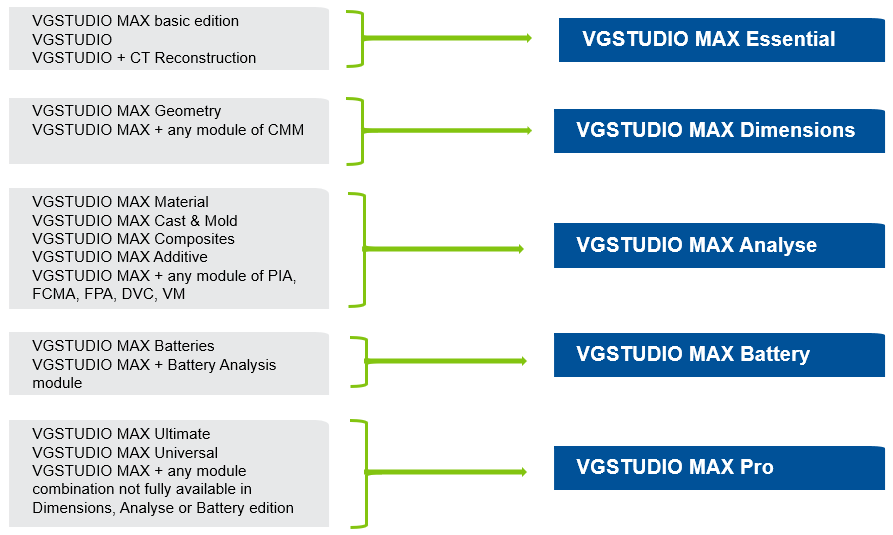
The new portfolio is organized around workflows instead of modules and consists of five dedicated product editions, making software selection significantly easier.
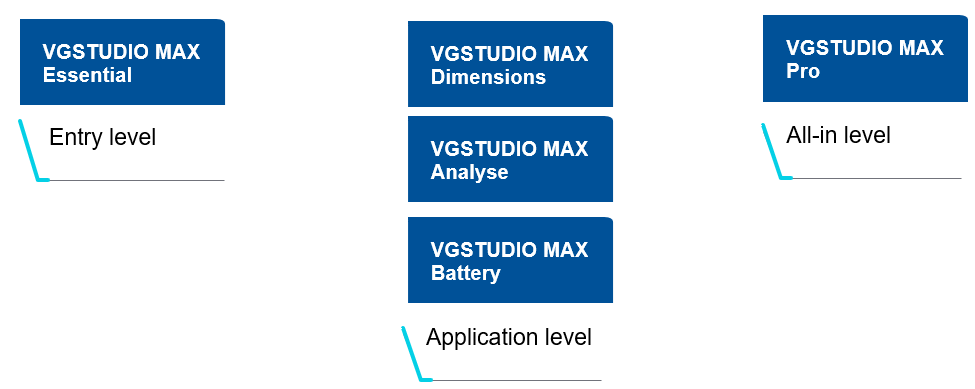
Several capabilities are now included directly within the editions:
- Deep segmentation
- CT reconstruction
- Multipart workflow functionality
- Subvoxel-precise surface determination
- Entry-level porosity analysis
The result: Less complexity. More value.
As part of the portfolio restructuring, VGMETROLOGY has been repositioned as a dedicated metrology solution for surface-based data. Surface determination has been assigned to the VGSTUDIO MAX product family, where it fits naturally within volume analysis and segmentation workflows.
While customers, especially from Science, using the Coordinate Measurement module are typically mapped to VGSTUDIO MAX Dimensions in the default migration path, the most suitable edition always depends on the individual workflow.
Some customers primarily use segmentation and surface determination capabilities rather than the full set of metrology functions included in Dimensions.
In such cases, VGSTUDIO MAX Essential may already provide the functionality required for their day-to-day work.
Explore our capabilities especially for Science here: https://volumegraphics.hexagon.com/en/solutions/science-and-research.html
Not sure whether VGSTUDIO MAX Essential or VGSTUDIO MAX Dimensions is the best choice for your workflow?
Your Hexagon representative and our VGScience experts will be happy to review your use case and help you identify the edition that best meets your requirements.
No, the hardware requirements for the new portfolio stay the same. You can find the current version under on our website.
No, you can use the existing infrastructure that was already used for previous versions.
Yes, projects, data, and workflows are compatible. However, for complex automation workflows, such as those used with VGinLINE, we recommend validating them before migrating.
A temporary evaluation license for the recommended successor edition in the new portfolio can be provided by our Sales team. You can find the contact information on our website.
As with previous software updates, our product releases are designed to maintain backward compatibility. In general, data exchange between older and newer software versions is supported as usual.
Yes. As part of the transition to the new VG product portfolio, customers need to migrate to the new portfolio structure and receive a new license file. This new license file activates the features of the new product portfolio.
Under the license terms, a customer may not continue using a previous software version once an upgrade has been provided. License files may temporarily support multiple software versions to facilitate migration to a newer version; however, this does not grant a permanent right to operate old and new versions in parallel.
Support for the legacy portfolio and its software maintenance agreements (SMAs) will end on June 30, 2028.
Until that date, existing customers may continue to renew maintenance agreements for products they already own.
Migration is optional. Customers with perpetual licenses can continue using their current portfolio indefinitely. However, migration will be required to continue receiving software maintenance services beyond June 30, 2028, including access to new software releases, new features, bug fixes, and technical support.
After that date, the legacy portfolio reaches end-of-support status.
Yes. Floating licenses in general are supported in the new portfolio.
As communicated, the regions of our floating license have been revamped.
The current floating licensing models can be mapped to the new licensing structure:
- Local Floating License → Area Floating License
- Country Floating License → Area Floating License or Global Floating License
- Continental Floating License → Area Floating License or Global Floating License
- Global Floating License → remains unchanged
Sometimes, it's just easier to chat quickly to get back on the right track. Get in touch with your Hexagon representative and let's get you the help you need!
Ask for help